The short version
A DJ tech rider is one page that tells the venue what the booth needs: which decks and mixer, or that you bring a controller; a stable table at a stated height; two booth monitors; how your sound gets to the house system; power at the table; and how long you play. The stage plot of the booth is page two. It is the shortest rider in music, and the one venues most often never receive.
01 The tool above
A DJ rider maker, filled in before you start.
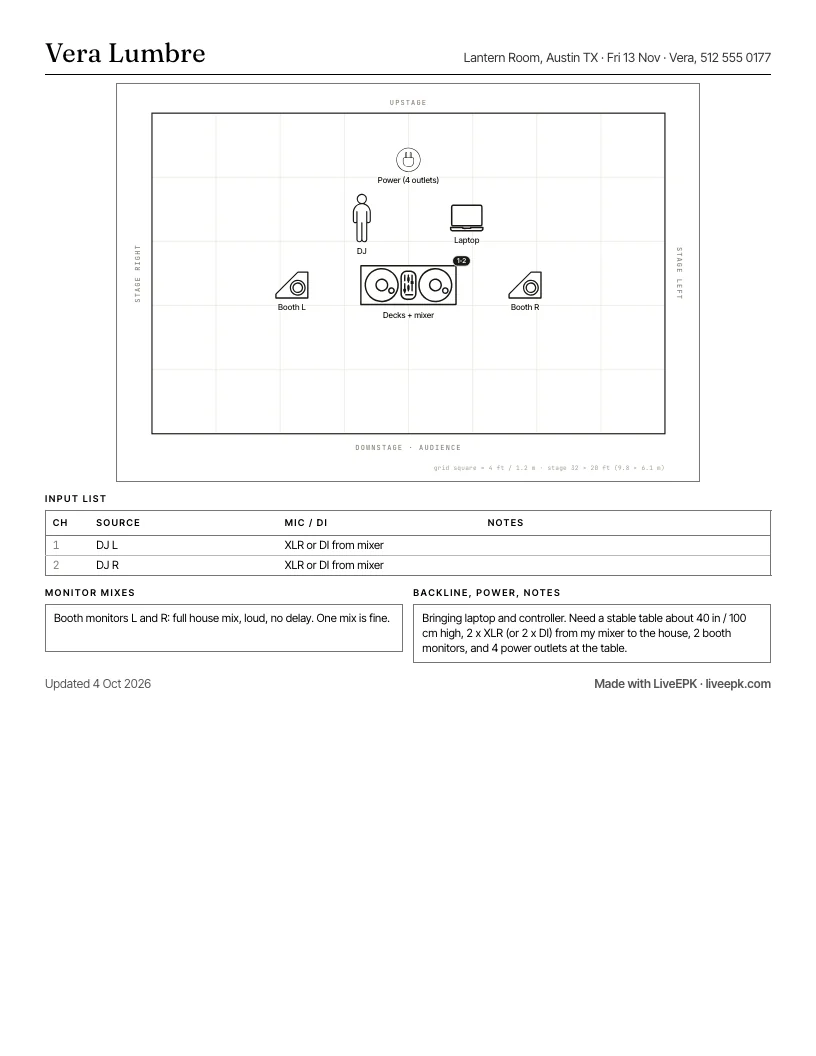
The template at the top of this page opens on a complete DJ rider: a laptop-and-controller setup with two XLR outputs to the house, two booth monitors, a table at 40 inches, and four outlets. Most DJs need to change three things: the gear line, the set length, and the name at the top.
- No account, ever. Not to edit, not to download the PDF, not to share a link. The rider is saved in your own browser.
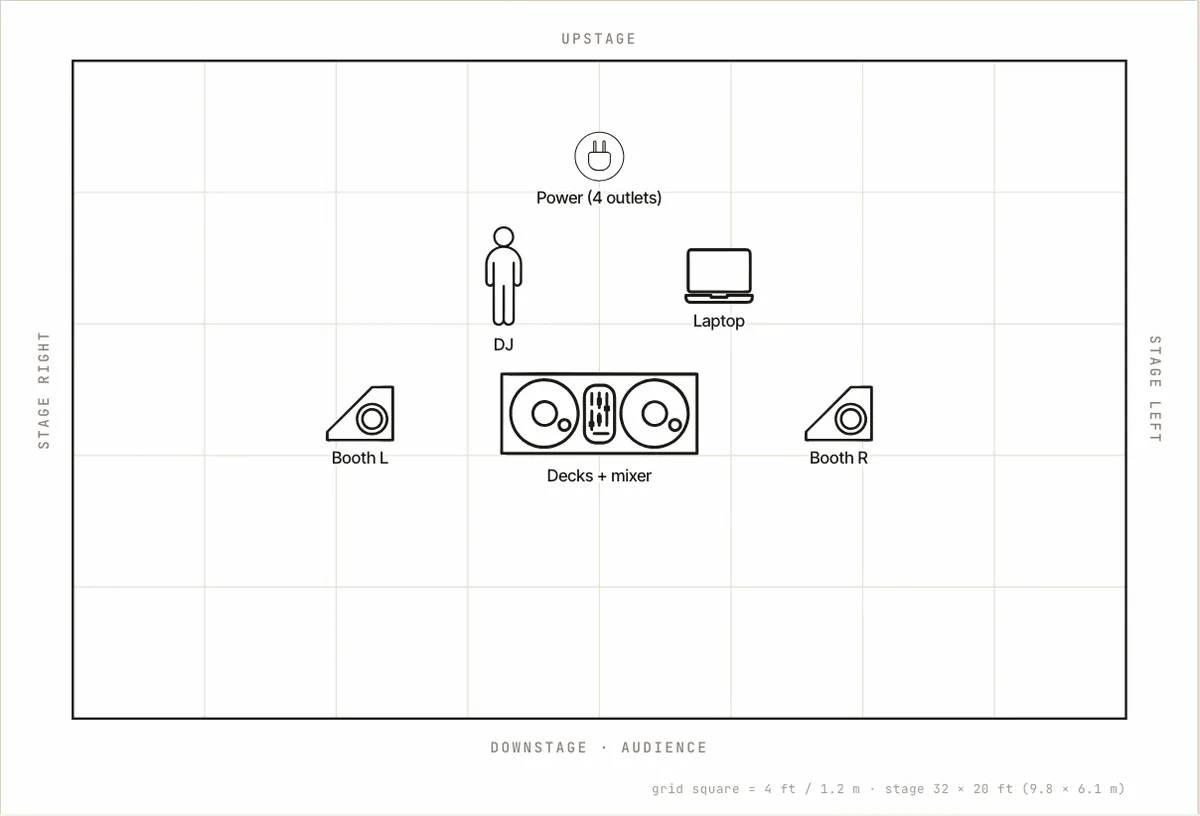
- Two pages. The written rider on page one; the booth stage plot and the two-channel input list on page two.
- Play on house decks? Replace the "we bring" line with the models you need, and keep the controller line as your fallback. Section 03 has the wording.
- Letter or A4, and a Spanish version of the same tool at rider técnico.
- Works on a phone, which is where most DJ riders get edited, in the car, an hour before doors.
This is the same tool as the tech rider template for bands, opened on the DJ example. The band version has six presets, a Word and Google Docs download, and the long guide.
02 Why bother
What a DJ rider prevents: the wrong decks, no booth sound, a shaky table.
Most bad DJ nights start the same way. You arrive to a pair of decks you have never used, or a mixer with no effects send, or a folding table that bounces when the floor moves. There are no booth monitors, so you are beat-matching off the delayed house sound. The power strip is across the room. None of that is the venue being difficult. Nobody told them.
A one-page rider, sent a week out, fixes all of it. The sound person reads it in two minutes and either says "fine" or tells you what they do not have, and you find out on Tuesday instead of at 11pm on Saturday. That is the whole point: it is a request, sent early, in the tone of someone who has done this before.
03 What goes in it
What goes in a DJ tech rider: eight lines.
- Contact. Your name and the phone number that will be answered on the night. At the top of the page, not in the email.
- Decks and mixer. The heart of the rider. Say which of these you are: you bring a laptop and controller and only need a table and a connection; you play on the club's CDJs and need specific models ("2 x CDJ-3000 and a DJM-900NXS2 or similar; CDJ-2000NXS2 is fine"); or you play vinyl and need two turntables on an isolated surface, away from the subs. If you can work with more than one setup, say so, in order of preference. Vague riders get the folding table.
- The table. Stable, about 40 inches (100 cm) high, deep enough for the gear, not on the same floor section as the dance floor if the room has a choice. This is the line most riders forget and the one that ruins the most nights.
- Booth monitors. Two, on their own level control, the full house mix with no delay. "One is fine" if you can live with it; say so.
- Connection to the house. How your sound leaves the booth: two XLR from your mixer, or two DIs if the house wants them. If you play on house decks, this line is theirs, and you say "house mixer to house system."
- Power. Four outlets at the table on one drop. A laptop, a controller, a phone charger, and a spare is four.
- What you bring, and what you do not. Headphones, USB drives, needles and cartridges if vinyl, all your own cables, a controller for rooms with no decks. The venue reads this line to know what not to look for.
- Set length, load-in, and one line on hospitality. "90 minutes, can extend. One person, five minutes; the table should be up when I arrive. Water at the booth." That is enough.
Lighting gets one line if you have anything to say ("club lighting is fine, no cues") and nothing if you do not. Nobody expects a DJ to travel a lighting person.
04 An example DJ tech rider
DJ tech rider example: what a working club DJ sends.
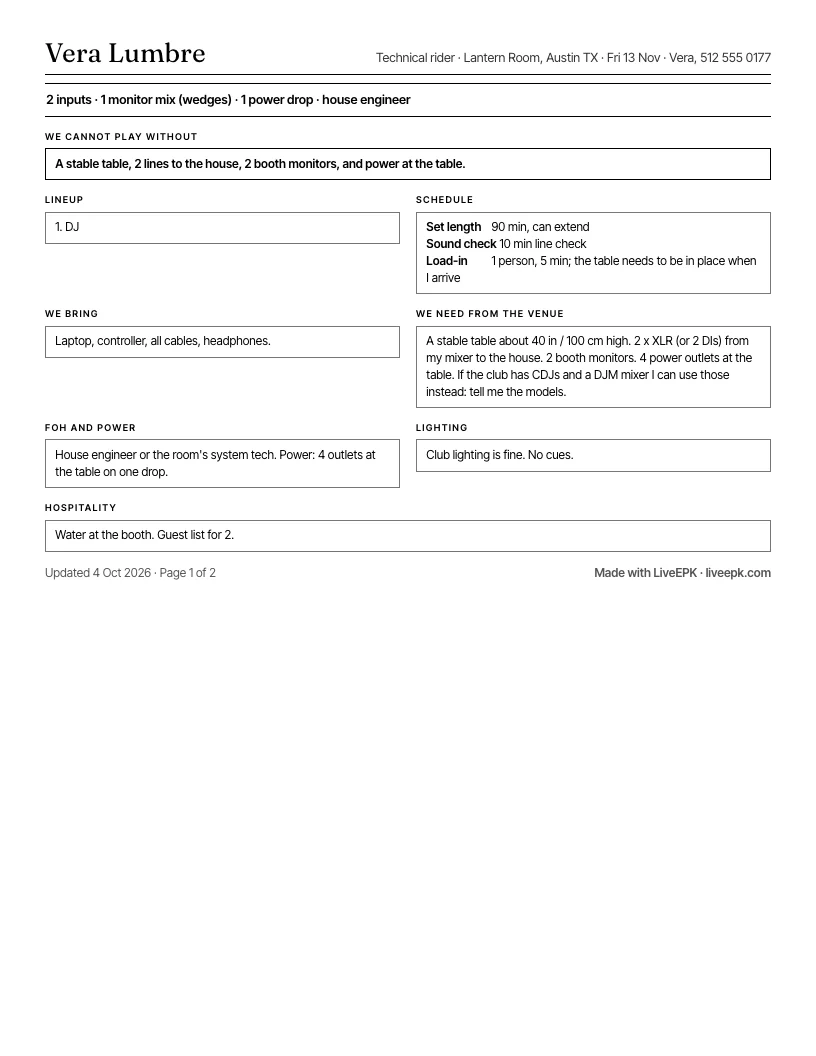
This is the DJ preset from the template, laid out the way it prints. Page two is the booth plot below. Every specific model says "or similar," the two setups are given in order of preference, and nothing is a demand.
Setup
1. DJ. Laptop and controller, or house CDJs, see below.
Schedule
Set length: 90 min, can extend Sound check: 10 min line check Load-in: 1 person, 5 min; the table needs to be in place when I arrive
I bring
Laptop, controller, all cables, headphones, USB drives with the set as backup.
I need from the venue
A stable table about 40 in / 100 cm high, not on the dance floor section. 2 x XLR (or 2 DIs) from my mixer to the house. 2 booth monitors on their own level. 4 power outlets at the table. If the club has 2 x CDJ-3000 (or CDJ-2000NXS2) and a DJM-900 or similar, I will play on those instead of the controller: tell me the models and I bring only USBs and headphones.
FOH and power
House engineer or the room's system tech. Power: 4 outlets at the table on one drop.
Lighting
Club lighting is fine. No cues.
Hospitality
Water at the booth. Guest list for 2.
05 Three kinds of DJ, three gear lines
Controller, CDJs, or vinyl: the one line that changes.
Laptop and controller. You need almost nothing: table, power, two outputs to the house, booth monitors. Say the controller's name so the engineer knows it has a built-in mixer and outputs on XLR or RCA. If it is RCA only, ask for two DIs.
House CDJs. Name the models you need and the ones you can accept. Say whether you need a USB link between the players and whether you use the mixer's effects. Ask them to confirm what is in the booth, because "we have CDJs" can mean anything from a 2026 pair to two players from 2009 with one working screen. Bring the controller anyway on a first visit.
Vinyl. Two turntables (1200s or similar) on an isolated surface, feet on damping if the room has it, the table away from the subs, and a mixer with phono inputs. Spare needles and a slipmat in the bag. If the room has never hosted vinyl, say so in the rider and offer the controller as the fallback; a bouncing needle is not a night either of you wants.
Back-to-back sets need a second line: two of everything, or a four-channel mixer, and a table wide enough for both people to stand behind it.
06 Hospitality, in one line
DJ hospitality rider: keep it to a sentence.
Touring headliners send a separate hospitality rider that goes to a different person at the venue. A club or regional DJ writes one line at the bottom of the tech rider and stops: water at the booth, a guest list of two, somewhere to leave a bag. A drink ticket is a courtesy the room offers, not a line in your rider. Asking a 200-cap club for a dressing room with a fruit plate is how you get remembered for the wrong reason. When a booking does include a meal, a room or a hotel, the hospitality rider template puts it on its own page.
07 Sending it
How to send a DJ rider: one PDF, in two places.
Attach the PDF to the advance email a week before the show, and ask one question in the email: "Can you confirm what decks and mixer are in the booth?" That single line saves more nights than the rider itself. Then put the same PDF in the Downloads section of your press kit, so the next promoter finds it without asking. If you do not have a press kit, the DJ press kit guide covers the whole page a promoter opens: bio, mixes, video, photos, dates, and this rider, with a full sample kit you can scroll.
Keep the venue and date fields generic in the copy you host ("Standard DJ rider, 2026") and fill them in per show when you export. The template saves in your browser, so that is a thirty-second job.
08 Quick answers
DJ tech rider: common questions.
- What should a DJ tech rider include?
- Eight things: a contact phone number, the decks and mixer you need or the controller you bring, a stable table at a stated height, two booth monitors, how your sound connects to the house system, power at the table, what you bring and what you do not, and your set length with a line on hospitality. One page. The template on this page has a field for each.
- Is a DJ rider different from a band tech rider?
- Same document, much shorter. A band rider covers a lineup, backline, monitor mixes, and an input list that can run to sixteen channels. A DJ rider covers one person, one table, two channels out, and two monitors. The gear line does most of the work, so get that one right.
- Do I need a tech rider if I bring a controller?
- Yes, and it is the easiest one to write. Say the controller's name, that you need a table at about 40 inches, two outputs to the house (XLR, or DIs if the house wants them), two booth monitors, and four outlets. Without it, the venue does not know whether to set up decks, clear a table, or run cables to the booth.
- What is a DJ hospitality rider?
- The part about the person rather than the show: drinks, a guest list, a place for a bag, parking, a dressing room for a headliner. For a club or regional DJ it is one line at the bottom of the tech rider. Touring DJs send it as a separate document because it goes to a different person.
- Can you give an example of a DJ tech rider?
- The one on this page: a laptop-and-controller setup with house CDJs as the preferred alternative, a 40 inch table off the dance floor section, two XLR or two DIs to the house, two booth monitors, four outlets, a 90 minute set that can extend, a 10 minute line check, one person loading in, water at the booth, and a guest list of two. It is the DJ preset in the template, so you can download it as a PDF right now and change the names.
- Is this DJ rider template free, and where does my rider go?
- Free, no account. The rider and the booth plot are saved in your own browser and in the share link, nowhere else. Download the PDF and it is yours. If you want the rider kept with your press kit, "Save it to your EPK" carries it into a free LiveEPK account, where you can publish it to the Downloads section of your kit.
Send the rider from the same link as your mixes.
Sign up free and the rider you just filled in comes with you: saved to your account, published to your press kit's Downloads in one click, updated in one place when your setup changes. Promoters open that link for the mixes and photos anyway; the sound person grabs the rider from the same place.
Save this rider to my EPKStart with the kit instead? How to build a DJ press kit, with bio examples and a full sample kit.