The short version
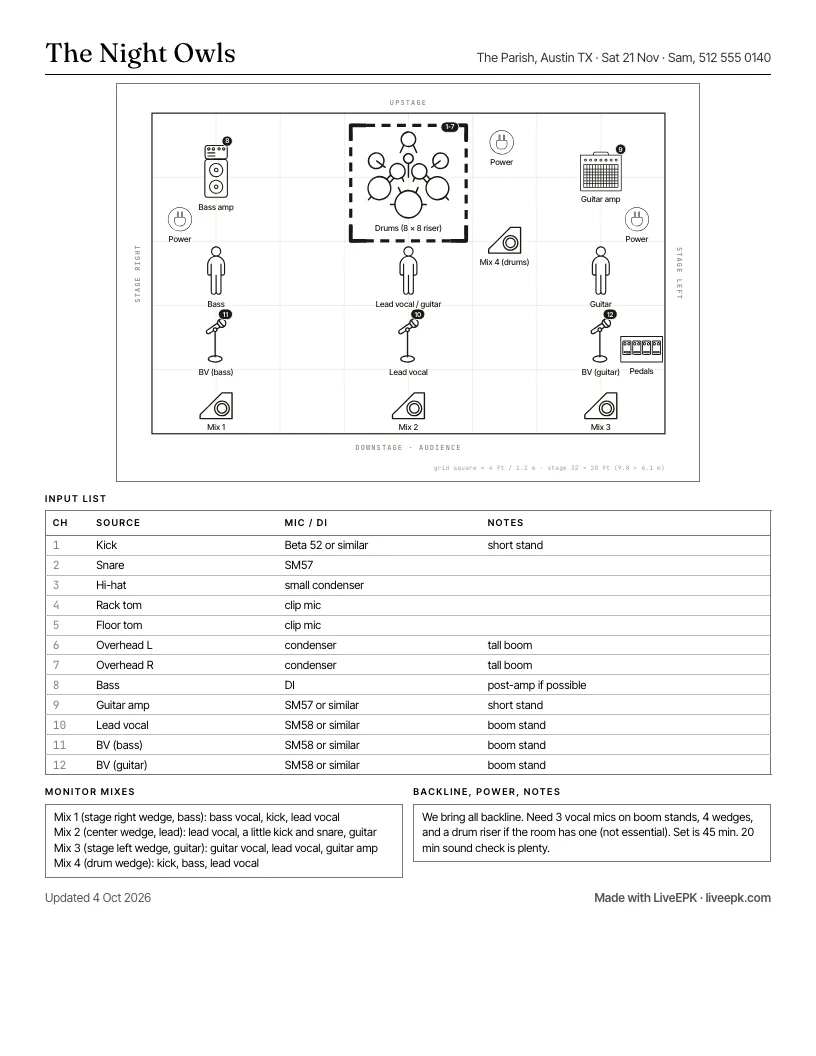
A stage plot is a top-down drawing of your band's setup: where every performer, instrument, amp, monitor, mic, and power drop goes. It travels with an input list, which tells the sound engineer what each channel is and what mic or DI it needs. One page, black and white, sent before the gig.
01 The tool above
A free stage plot maker, no account at any step.
You will see this kind of tool called a stage plot maker, a stage plot creator, a stage plot generator, a stage plot designer, or a stage plot builder. Same job under every name: put your band on a drawing of the stage and hand the engineer one clean page. Each preset here is also a stage plot template, so you can start from a band like yours and move things.
- No account, ever. Not to start, not to download, not to share a link. Nothing is uploaded; your plot is saved in your own browser.
- Free PDF and PNG, as many times as you like. No watermark and no ads. The sheet carries one small credit line at the foot.
- Six stage plot templates: 4-piece rock band, 7-piece with keys and horns, singer-songwriter duo, solo acoustic, jazz trio, and DJ. Each is shown as its printed page on the stage plot template page, and laid out with its rider on the stage plot examples page.
- The input list builds itself as you place mics and DIs, with monitor mixes underneath. Every cell is editable, and it downloads as a CSV.
- Channel numbers on the drawing. Each mic, amp and DI carries the number of its row in the input list, so the engineer reads the two as one document. Reorder the list and the drawing follows.
- A check before you send it. It points out a mic with no channel, a channel with no mic, a wedge with no mix, and a missing contact. It never blocks the download.
- Undo and redo, a text label you can put anywhere, and risers in any size.
- Real stage sizes, from a 16 x 12 ft bar corner to a 40 x 28 ft room, or your own. Gear stays at true scale, so you can see what fits.
- 39 gear icons drawn as top-down stage symbols, plus a box you can label as anything.
- Letter or A4, and it works on a phone. There is a Spanish version in meters.
- Keep it with your press kit, if you want. The free EPK builder publishes the plot in your kit's Downloads section, next to the photos and bio a booker opens anyway.
How that compares with the other free tools is on its own page: free stage plot and tech rider makers, compared.
02 What a stage plot is for
What a stage plot is for: fifteen minutes of sound check, saved.
Every venue engineer runs the same drill when a band loads in: how many of you, where do you stand, what needs a mic, what needs a DI, how many wedges. A stage plot answers all of it before you arrive. The engineer patches the stage box during the changeover, the monitors are already roughly right, and your set starts on time instead of ten minutes late while someone hunts for a third DI.
It is also the document that makes you look like a band that has done this before. A promoter who gets a clean plot and input list with the advance email books you again. One who gets "we'll figure it out at sound check" remembers that too.
03 What goes on it
What goes on a stage plot: seven things, nothing clever.
- Performers, labeled by role and name. "Sam, lead vocal / acoustic" beats a stick figure.
- Instruments and amps, roughly where they sit. Amps behind the player, keys where the player faces the crowd.
- Mics and DIs, one icon per input. Vocal mics on booms, instrument mics on short stands, DI boxes next to what they take.
- Monitors, numbered by mix. Wedges downstage of each singer, a drum wedge or in-ears at the kit.
- Power drops, where you need outlets. Amps, pedalboards, keys, laptops.
- Risers, if you want one. Drum risers are the usual ask and the usual thing a small room does not have.
- Orientation labels. Upstage, downstage, stage left, stage right. Without them the engineer has to guess which way you are facing.
Keep it to what the engineer needs to patch and place. Song list, merch table, and lighting wishes go in the rider, not on the plot.
04 The one convention people get backwards
Stage left vs stage right: stage left is your left.
Stage directions are from the performer's point of view, facing the audience. Stage left is the side on the performer's left hand, which is the audience's right. Stage right is the performer's right. Upstage is the back wall, downstage is the lip of the stage nearest the crowd. That is why the labels on the plot above put "stage left" on the right-hand edge of the drawing: you are looking down at the stage with the audience at the bottom.
If you tell a venue "the bass amp is stage left" and mean the audience's left, the engineer will patch it on the wrong side and you will find out during the first song. When in doubt, write both: "stage left (house right)."
05 The input list
The stage plot input list: every channel, in the order engineers expect.
The input list is a table with one row per thing that goes into the console. The tool above builds it for you as you place icons; you can edit any cell. Engineers patch in a conventional order, and following it makes the list instantly readable: drums first, then bass, guitars, keys, other instruments, and vocals last.
| Ch | Source | Mic / DI | Notes |
|---|---|---|---|
| 1 | Kick | Beta 52 or similar | short stand |
| 2 | Snare | SM57 | |
| 3 | Hi-hat | small condenser | |
| 4 | Rack tom | clip mic | |
| 5 | Floor tom | clip mic | |
| 6 | Overhead L | condenser | tall boom |
| 7 | Overhead R | condenser | tall boom |
| 8 | Bass | DI | post-amp if possible |
| 9 | Guitar amp | SM57 | short stand |
| 10 | Lead vocal | SM58 | boom stand |
| 11 | Backing vocal (bass) | SM58 | boom stand |
| 12 | Backing vocal (guitar) | SM58 | boom stand |
Write "or similar" after mic models unless you are bringing them. Naming a specific microphone is a preference, not a demand, and a small room may not own it. What matters is whether the engineer needs a dynamic, a condenser, or a DI, and whether the stand is short or tall.
06 Monitor mixes
Monitor mixes on a stage plot: say what each wedge carries.
Number the monitors on the plot and describe each mix in a line: who it is for, and what they need to hear more of. "Mix 2 (center wedge, lead vocal): mostly vocal, a little kick and acoustic" is enough. Engineers do not need percentages.
Fewer mixes than players is normal. A four-piece in a bar usually gets three or four wedges on two or three mixes. If you use in-ears, say so, and say whether you bring your own packs and mixer or need a feed from the desk.
07 What a small act should and should not ask for
Stage plot dos and don'ts: ask like a band that has played the room.
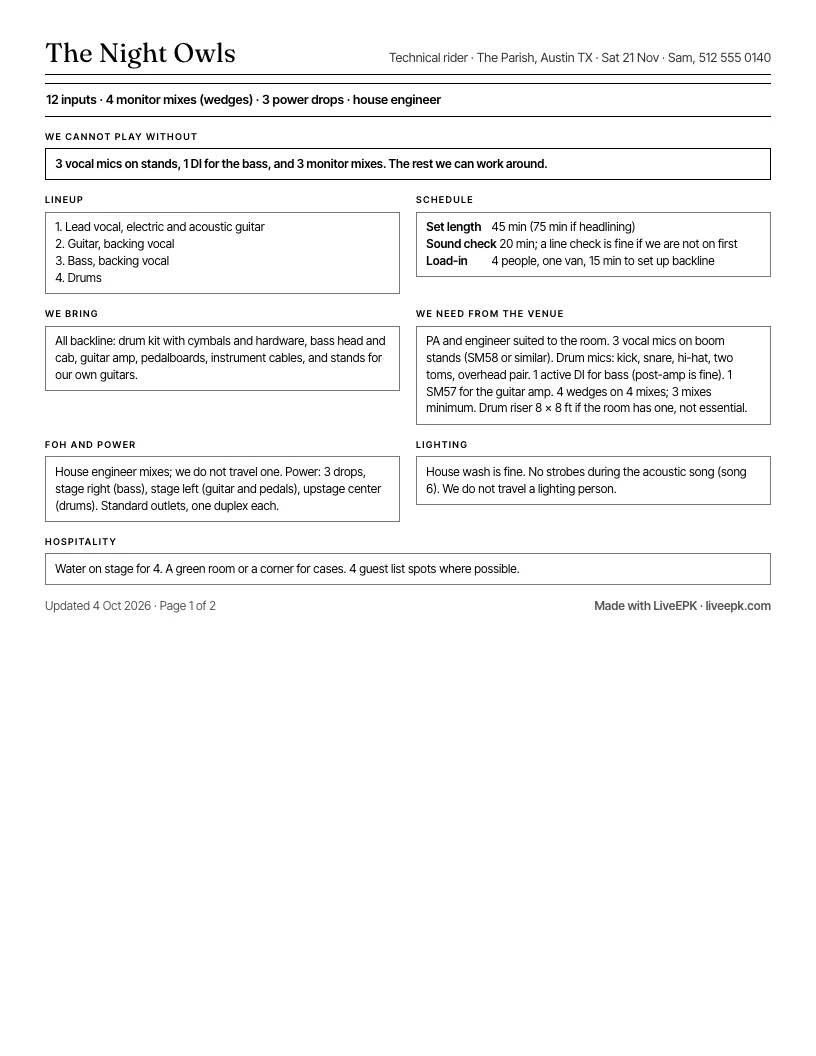
- Do list what you bring and what you need from the venue. "We bring all backline. Need 3 vocal mics on booms, 1 DI, 3 wedges."
- Do keep it to one page and print it in black and white. Engineers tape these to the console.
- Do put a phone number on it. The plot gets separated from the email.
- Don't demand specific gear, a drum riser, or six monitor mixes for a 60-capacity room. Write it as a preference and the engineer will do what the room allows.
- Don't send a photo of a napkin drawing. It reads as an afterthought, and it usually leaves out the DIs.
08 From the other side of the desk
What sound engineers want on a stage plot: numbers, a date, plain shapes.
The people who receive stage plots have written down what they wish bands sent. Three of them, in their own articles:
- Match the drawing to the list. Steve La Cerra, a touring front-of-house engineer writing for Yamaha, asks that mics and DIs on the plot carry numbers that match the input list, and that each position has the band member's name. Seven ways to ensure a smooth sound check.
- Keep it current, and say so. Eric Ferguson, writing for ProSoundWeb, puts out-of-date documents at the top of his list of problems: plots from an old tour, passed along without changes. He asks for a date on the page, a contact, a plain block font in a size that reads on a dim stage, and a PDF. Best practices in developing input lists and stage plots.
- Keep it simple. Aaron Staniulis, a freelance engineer writing for Sonicbids, says a plot that needs a colour key and oversize paper has gone too far, and that the house tech knows the room: name the mic you would like and let them choose. A stage plot and input list that sound techs will love.
The stage plot maker is built that way. The sheet is black and white, every item is labelled in words and carries its channel number, the input list runs drums first and vocals last, the date and a contact sit across the top, the day it was last changed prints at the foot, and it downloads as a PDF. Rename each performer with the player's name, and put a phone number in Contact that someone at the show will answer.
One place they differ from this page: Ferguson would rather have the plot and the input list as separate pages on a bigger production. For a club or bar act, one page is what most venues ask for, and that is the default here. Turn on the Tech rider tab when the show needs more.
09 Sending it
How to send a stage plot: where it should live.
Name the file with your band and the year, something like night-owls-stage-plot-2026.pdf, and attach it to the advance email a week before the show. Then stop attaching it to everything. Put the PDF in the Downloads section of your EPK next to the press photos and the bio (the free EPK builder includes that section), and every booker, engineer, and festival production office can grab the current version from the same link you already send them. When the lineup changes, you update one file in one place. If you do not have a press kit yet, the music press kit template shows every section with example copy, and how to make an EPK gets you from a folder of files to one link in about twenty minutes.
A stage plot is one of the four documents a festival or a serious venue asks for on the same day: the plot, the input list, a short tech rider, and the press kit. Keeping them together is the whole point of an EPK. For the night itself, the setlist maker prints the song order in type you can read from the stage, with a copy for the engineer.
10 Quick answers
Stage plot maker: common questions.
- What is the best free stage plot maker?
- Look for five things: a stage drawn to scale, so the plot matches the real room; an input list that builds itself as you add gear; monitor mixes; a one-page PDF the engineer can print; and no account to start. The LiveEPK stage plot maker does all five for free, with six presets to start from, and when you want the plot kept, it carries it into your press kit.
- What is a stage plot?
- A stage plot is a top-down drawing of a band's setup: where every performer, instrument, amp, monitor, mic, and power drop goes on stage. It travels with an input list, which tells the sound engineer what each channel is and what mic or DI it needs. One page, black and white, sent before the gig.
- Is a stage plot the same as a tech rider?
- No. The stage plot is the drawing. A tech rider is the full document: the plot, the input list, monitor mixes, backline you bring or need, power, and sometimes hospitality. The plot and input list from this page cover most of a small act's rider; the rest is a few lines of text. Switch to the Tech rider tab in the tool above and the PDF grows to two pages, rider first, plot second. The tech rider template page opens on that tab and walks through every section.
- Do I need a stage plot for a bar gig?
- A simple one, yes. Even a three-piece has a kick mic, a bass DI, a guitar mic, and two vocals. Handing the engineer that on a page saves the first fifteen minutes of every load-in, and it is what separates bands that get asked back from bands that get tolerated.
- What size should a stage plot PDF be?
- One page, Letter in the US and A4 everywhere else. The tool above exports either. Print-friendly black and white, because that is how it will be printed.
- Does the stage size matter on a stage plot?
- More than the shape. Pick the size closest to the room you are playing and the gear stays at real size, so you can see whether a drum riser and four wedges actually fit on a 16 by 12 corner stage before the engineer tells you. Shape almost never matters: nearly every stage is a rectangle, and a thrust or corner stage is the venue's problem to solve, not yours. What the venue needs from you is your minimum footprint, so put a line like "we need 16 x 12 ft minimum" in the notes.
- Do DJs need a stage plot?
- Yes, and it is the easiest one to make: the table with its height, where the booth monitors go, the laptop, power, and two outputs from the mixer to the house. Use the DJ preset above. The DJ press kit guide covers the rest of what a promoter asks for.
- Stage plot maker, creator, generator, template: is there a difference?
- No. They are different names for the same kind of tool. A stage plot maker (or creator, generator, designer, builder) lets you drag your band onto a drawing of the stage and export a page for the sound engineer. A stage plot template is a starting layout you edit; the six presets in the LiveEPK stage plot maker are templates for a 4-piece rock band, a 7-piece with keys and horns, a duo, a solo act, a jazz trio, and a DJ.
- Is the LiveEPK stage plot maker really free, and where does my plot go?
- Free, no account. Your plot is saved in your own browser and in the share link, nowhere else. Download the PDF or PNG and it is yours. If you want it kept with your press kit, "Save it to your EPK" carries the plot into a free LiveEPK account, where you can publish it to your Downloads section.
Put the plot where bookers already look.
Sign up free and the plot you just made comes with you: saved to your account, published to your EPK's Downloads in one click, and updated in one place when the lineup changes. The rest of the kit (bio, music, photos, dates) lives at the same link. Free to build and publish, no credit card.
Save this plot to my EPKNot sure what free includes? See the free EPK builder: every template, publishing, and the Downloads section, with no trial clock.